
Security cameras have become an important component for home and business surveillance systems in Orange County. People realise and give much more importance to the video recording quality, but at the same time, the audio recording also deserves brief attention. Audio provides significant information and enhances the overall process of security monitoring. However, security camera audio can be problematic sometimes. Many issues affect the overall audio result. Good knowledge of common security camera audio problems is very beneficial and effective. In this blog, we will discuss all the common problems related to security camera audio.
No Audio Recording
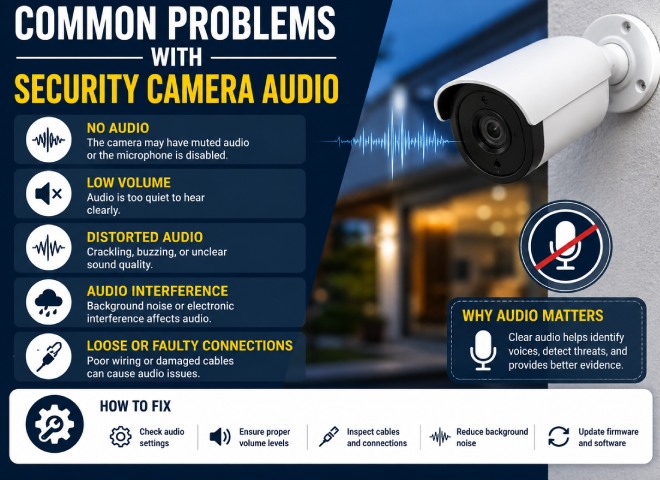
It is one of the most frustrating issues: a security camera records the video perfectly, but the sound is muted, or there is no sound. Several factors are involved in these issues, including the turned-off sound option; audio recording may be turned off in the camera settings; the microphone may be defective or damaged; and a loose cable connection can also cause the problem for audio recording. In other situations, the device’s mic may have broken down after consistent use, or the security camera may not feature any internal microphone.
Common causes include:
- Audio recording is disabled in camera settings.
- Defective or damaged microphone.
- Loose cable connections.
- Firmware or software compatibility issues.
Poor or Distorted Audio Quality
Another commonly occurring issue with security camera sound systems is distorted audio. Rather than recording conversation clearly, the audio will be polluted by a humming, crackling sound that breaks the flow of the conversation. One of the main reasons behind poor sound is interference from other sources of sound, which can be due to low-quality microphones, electronic disturbances, or incorrect placement of the microphones. This problem happens commonly with outdoor cameras, which pick up wind noises, rain, and sounds produced by cars and heavy vehicles on the road.
Possible reasons include:
- Electrical interference.
- Microphones of weak quality .
- Wind and environmental noise.
- Incorrect microphone sensitivity settings.
Audio Delay or Synchronization Issues
On some occasions, sound and images do not seem to come together. Like the audio comes before the visuals, it is difficult for the viewer to understand, like what is happening in the clip. Such delays may be caused by the delay of the network, a recording system that is too busy, outdated software, or low processing power for video files. Wireless cameras are more likely to run into Audio synchronization issues than wired cameras.
Typical causes are:
- Slow network connection.
- High system workload.
- Outdated firmware.
- Poor video format settings.
Background Noise and Echo
The background noise also causes problems to capture better quality sounds. The effectiveness of the footage may be hindered by repeated sounds, machine noises or constant buzzing. Such situations are typically seen in large spaces such as big rooms, stores, parking areas, or open spaces where outside sounds overshadow speech. Poor placing of the microphone may also contribute to this problem as the noise is increased.
Common sauces are:
- Air conditioners or fans.
- Traffic
- Construction noise.
- Echo from large empty spaces.
- Incorrect microphone placement.
Intermittent Audio Dropouts
Intermittent audio is a phenomenon where audio keeps cutting off in between during the recording. The occurrence of this problem is random, and feasible only during certain recordings. It can happen due to unstable internet connections, broken cables, power issues, and too much load on network bandwidth. The issue of intermittent audio is more probable in wireless security cameras.
Possible causes include:
- Weak Wi-Fi signal.
- Faulty power supply.
- Network congestion.
- Loose audio connections.
Tips to Avoid Security Camera Audio Problems
- Keep in mind to check the audio recording option, if it is closed, turn it on.
- All companies that manufacture microphones are serious about improving their devices and keep updating their firmware to fix bugs.
- Always choose a camera with noise elimination features and quality microphones while making a purchase.
- Make sure of your camera placement options without sound around, and don’t install the equipment next to sound-emitting machines, air conditioning machines, busy roads, and vibrating machines.
- Cover out-of-home microphones either with a wind cover or a weatherproof device to eliminate the noise caused by the wind.
- Ensure that a secure internet connection is in place. A wired link is usually better than using Wi-Fi that is not stable.
- Cable and connections need to be checked on a regular basis to find out if any cables are worn out or whether a power connector could be impacting on audio transmission.
- Adjust microphone sensitivity. The microphone’s gain must be regulated according to the ambient environment so that distortion and very low recording levels can be prevented.
- Conduct periodic system tests. Carry out tests of audio and video recordings from time to time to catch problems with audio and video images before they turn into big security issues.
Final Summary
It is equally important to have reliable audio from your security cameras as it is to have clear video footage. Issues such as the absence of audio, distortion, delay in audio synchronization, background noises, and loss of sound may limit or ruin the efficiency of your system. Luckily, the majority of the problems regarding a security camera can easily be prevented if you take the service of experts, like FDS Orange County, who understand the correct installation process, do proper maintenance of the device, use up-to-date software, use good-quality hardware, and ensure appropriate placement of the microphone. Follow the recommendations given above to guarantee better audio quality and performance of your security system.